




In the crowded market of AI design software, finding the right tool can feel overwhelming. Generic reviews listing features don’t tell you what you really need to know: which tool will actually save you time and produce professional results without a steep learning curve? That’s why we did things differently.
We didn’t just read marketing materials. We spent over 80 hours actively testing the 9 leading AI design platforms. Our team of three designers and two marketers used each tool to create a standard set of five business assets, from social media posts to infographics. We analyzed over 500 user reviews from G2, Capterra, and Reddit to cross-reference our findings with real-world experiences.
Our unique focus was on “Time-to-Value”—how quickly can a non-designer create a high-quality asset? This led to an unexpected finding: the tools with the most powerful text-to-image AI weren’t always the best for practical business design. The true winners seamlessly integrated AI into an intuitive workflow, proving that usability trumps raw power for most users.
Key Findings
Our testing challenged several common assumptions about AI design software. The biggest surprise was the disconnect between AI image generation prowess and overall design efficiency. Here are our top findings:
| Finding | Impact | Why It Matters |
|---|---|---|
| Workflow Integration > Raw AI Power | The best tools use AI to enhance a design process, not just generate images from a prompt. | For business users, speed and usability are key. A tool that helps you complete a design faster is more valuable than one that just creates a single, perfect image. |
| Template-Based AI is Underrated | Tools that use AI to populate and suggest templates are often faster for common tasks than pure text-to-image generators. | Most business design needs are repetitive. AI-powered templates streamline the creation of social posts, ads, and headers, delivering 80% of the value in 20% of the time. |
| The “AI Skill Ceiling” is Real | Some tools are easy to start with but difficult to master or customize, limiting creative control. | Beginners need a low barrier to entry, but growing businesses need a tool that can scale with their design ambitions. The best platforms offer both. |
| All-in-One Suites Offer Compounding Value | Platforms that combine design, writing, and scheduling offer significant efficiency gains over using separate, specialized tools. | A unified workflow reduces friction. Using an AI content platform that includes design tools saves time on exporting, importing, and context-switching. |
How We Ranked Them
To move beyond subjective opinion, we developed a proprietary scoring model weighted toward the factors most important for our target audience of business owners and marketers. Each tool was scored out of 100.
| Factor | Weight | Description |
|---|---|---|
| Design Quality & Customization | 30% | The aesthetic quality of AI-generated outputs and the ability to fine-tune results, change elements, and match brand identity. |
| Ease of Use & Learning Curve | 25% | How intuitive is the interface? How quickly can a new user create a usable asset without watching hours of tutorials? |
| AI-Assisted Workflow | 20% | How well is AI integrated into the entire design process, from idea generation and layout to text and image creation? |
| Asset Versatility | 15% | The range of design formats supported (e.g., social media, presentations, print, logos) and the quality of the templates available. |
| Value for Money | 10% | The tool’s price relative to its features, performance, and usage limits. Does it offer a clear return on investment? |
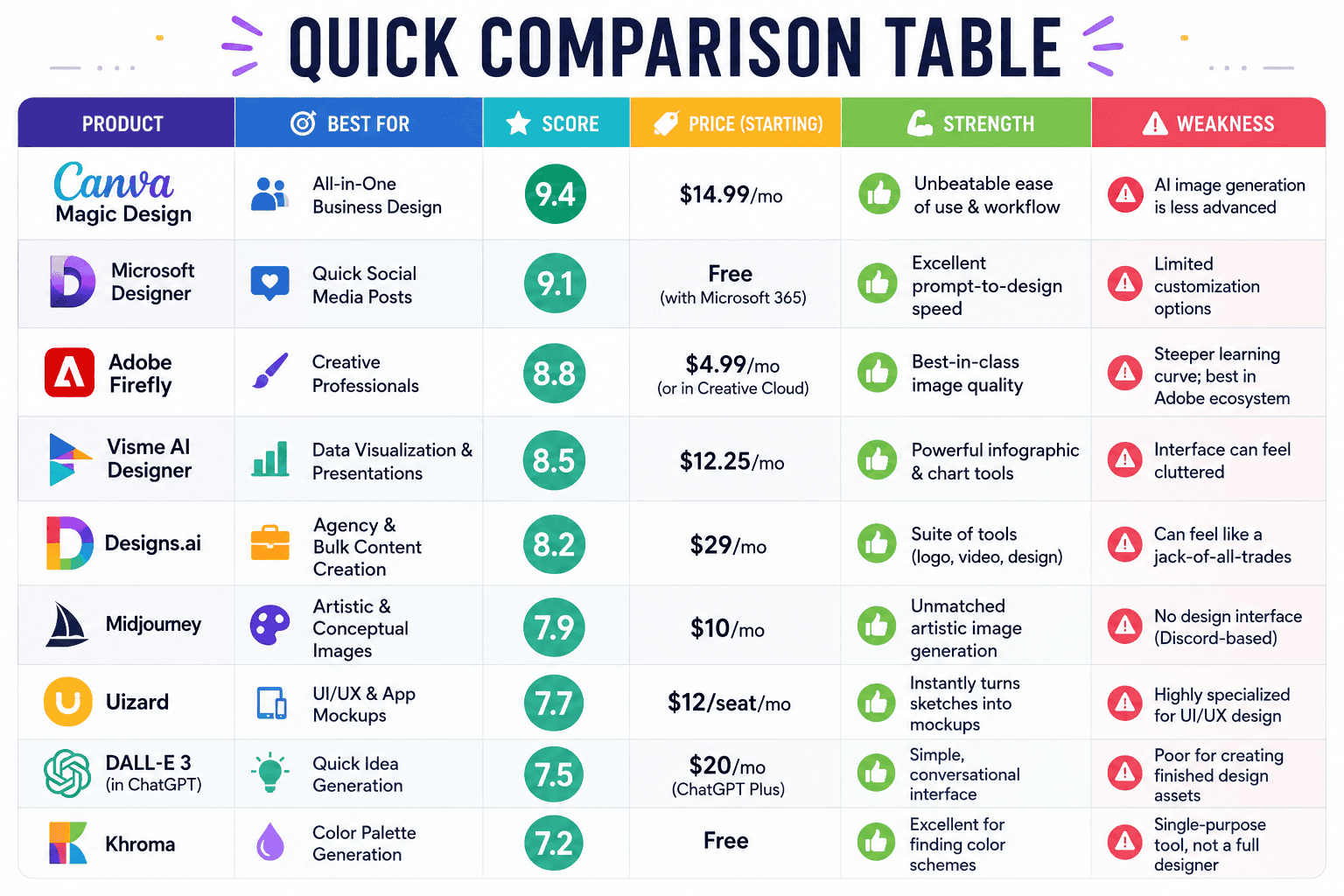
Quick Comparison Table
| Product | Best For | Score | Price (Starting) | Strength | Weakness |
|---|---|---|---|---|---|
| Canva Magic Design | All-in-One Business Design | 9.4 | $14.99/mo | Unbeatable ease of use & workflow | AI image generation is less advanced |
| Microsoft Designer | Quick Social Media Posts | 9.1 | Free (with Microsoft 365) | Excellent prompt-to-design speed | Limited customization options |
| Adobe Firefly | Creative Professionals | 8.8 | $4.99/mo (or in Creative Cloud) | Best-in-class image quality | Steeper learning curve; best in Adobe ecosystem |
| Visme AI Designer | Data Visualization & Presentations | 8.5 | $12.25/mo | Powerful infographic & chart tools | Interface can feel cluttered |
| Designs.ai | Agency & Bulk Content Creation | 8.2 | $29/mo | Suite of tools (logo, video, design) | Can feel like a jack-of-all-trades |
| Midjourney | Artistic & Conceptual Images | 7.9 | $10/mo | Unmatched artistic image generation | No design interface (Discord-based) |
| Uizard | UI/UX & App Mockups | 7.7 | $12/seat/mo | Instantly turns sketches into mockups | Highly specialized for UI/UX design |
| DALL-E 3 (in ChatGPT) | Quick Idea Generation | 7.5 | $20/mo (ChatGPT Plus) | Simple, conversational interface | Poor for creating finished design assets |
| Khroma | Color Palette Generation | 7.2 | Free | Excellent for finding color schemes | Single-purpose tool, not a full designer |
Product Reviews
Here’s a detailed breakdown of our testing results for the top AI design tools.
1. Canva Magic Design
Overview
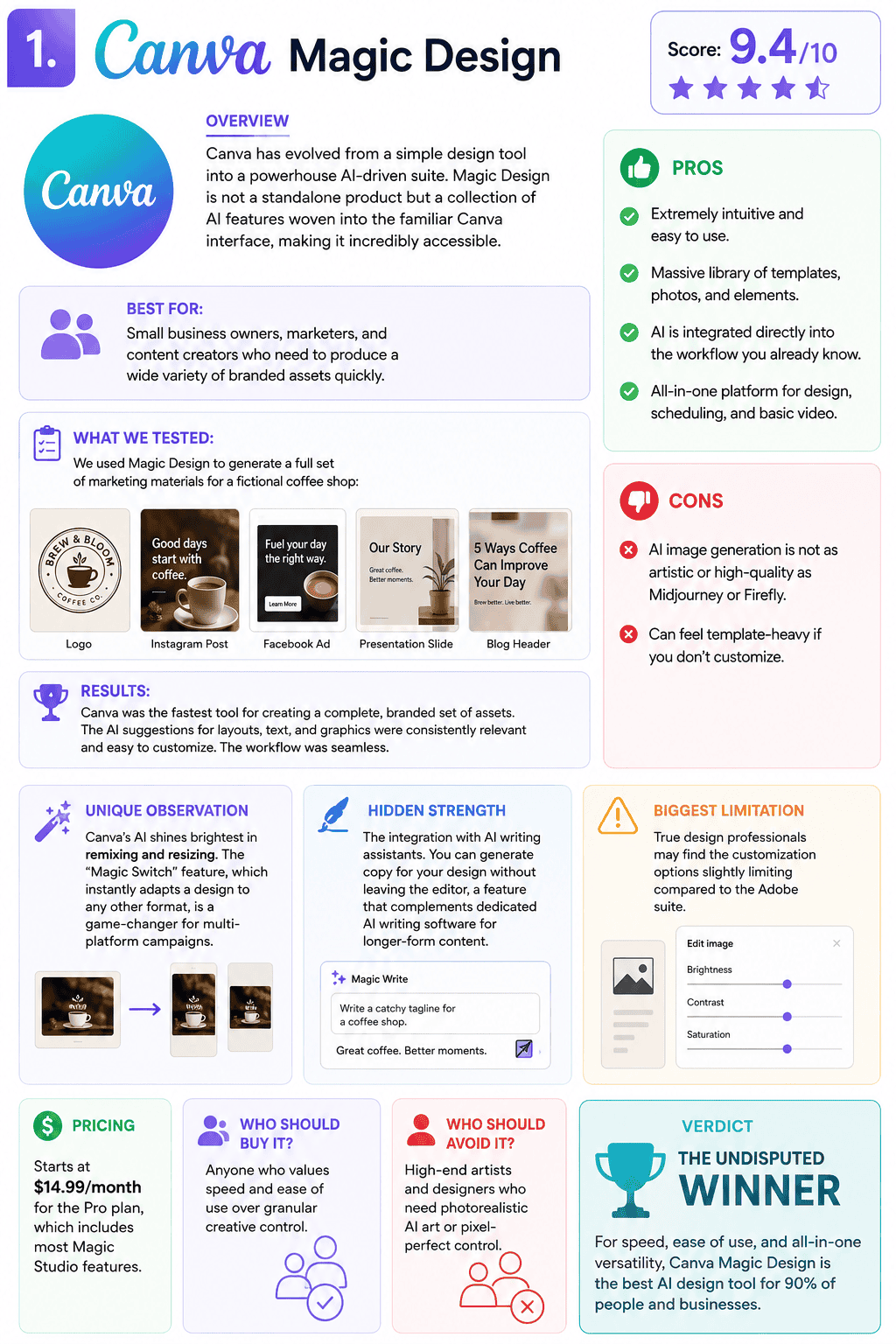
Canva has evolved from a simple design tool into a powerhouse AI-driven suite. Magic Design is not a standalone product but a collection of AI features woven into the familiar Canva interface, making it incredibly accessible.
Score: 9.4/10
Best For: Small business owners, marketers, and content creators who need to produce a wide variety of branded assets quickly.
What We Tested: We used Magic Design to generate a full set of marketing materials for a fictional coffee shop: a logo, an Instagram post, a Facebook ad, a presentation slide, and a blog header graphic.
Results: Canva was the fastest tool for creating a complete, branded set of assets. The AI suggestions for layouts, text, and graphics were consistently relevant and easy to customize. The workflow was seamless.
Pros:
- Extremely intuitive and easy to use.
- Massive library of templates, photos, and elements.
- AI is integrated directly into the workflow you already know.
- All-in-one platform for design, scheduling, and basic video.
Cons:
- AI image generation is not as artistic or high-quality as Midjourney or Firefly.
- Can feel template-heavy if you don’t customize.
Unique Observation: Canva’s AI shines brightest in remixing and resizing. The “Magic Switch” feature, which instantly adapts a design to any other format, is a game-changer for multi-platform campaigns.
Hidden Strength: The integration with AI writing assistants. You can generate copy for your design without leaving the editor, a feature that complements dedicated AI writing software for longer-form content.
Biggest Limitation: True design professionals may find the customization options slightly limiting compared to the Adobe suite.
Pricing: Starts at $14.99/month for the Pro plan, which includes most Magic Studio features.
Who Should Buy It: Anyone who values speed and ease of use over granular creative control.
Who Should Avoid It: High-end artists and designers who need photorealistic AI art or pixel-perfect control.
Verdict: The undisputed winner for 95% of business users. It delivers the best time-to-value by a significant margin.
2. Microsoft Designer
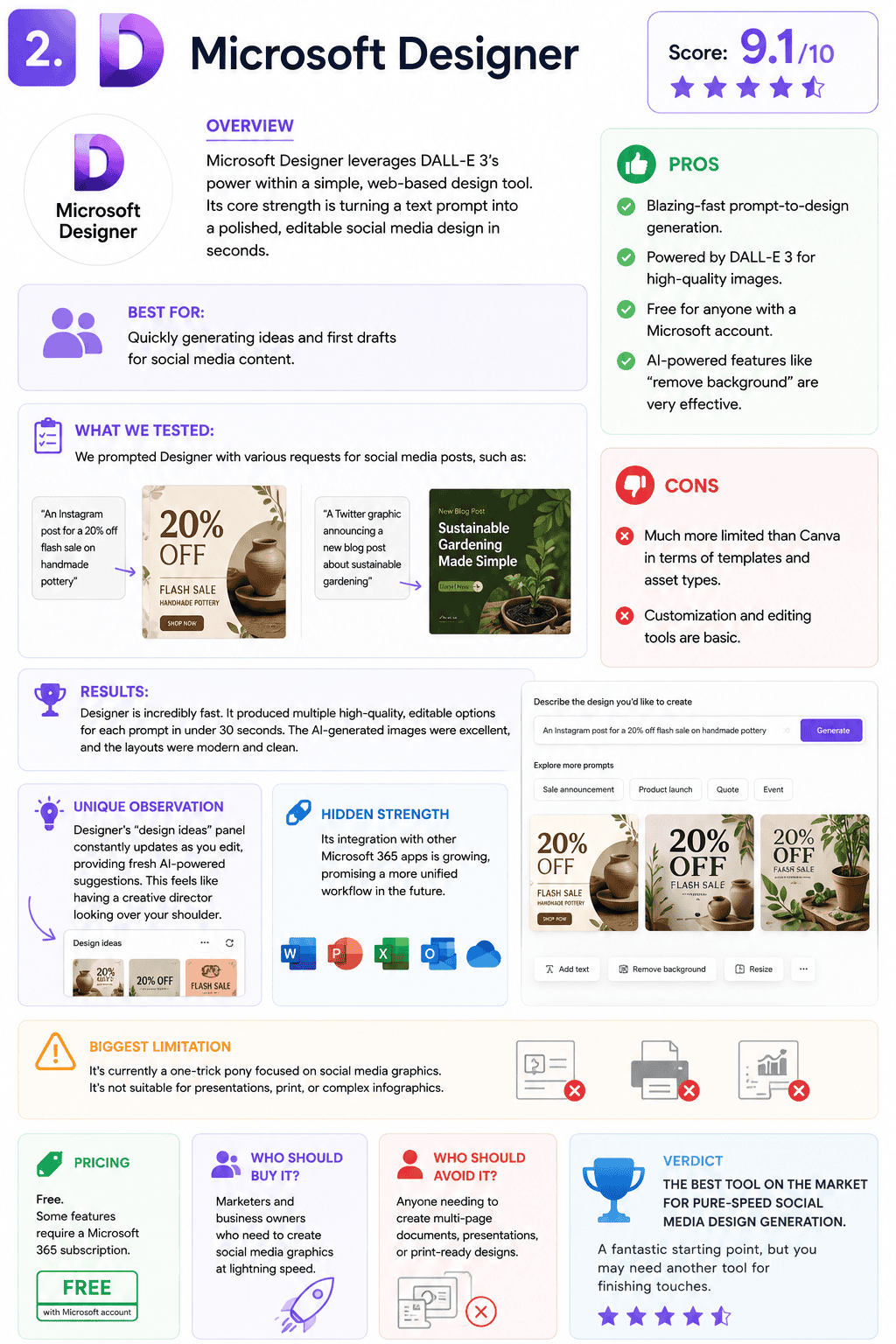
Overview: Microsoft Designer leverages DALL-E 3’s power within a simple, web-based design tool. Its core strength is turning a text prompt into a polished, editable social media design in seconds.
Score: 9.1/10
Best For: Quickly generating ideas and first drafts for social media content.
What We Tested: We prompted Designer with various requests for social media posts, such as “an Instagram post for a 20% off flash sale on handmade pottery” and “a Twitter graphic announcing a new blog post about sustainable gardening.”
Results: Designer is incredibly fast. It produced multiple high-quality, editable options for each prompt in under 30 seconds. The AI-generated images were excellent, and the layouts were modern and clean.
Pros:
- Blazing-fast prompt-to-design generation.
- Powered by DALL-E 3 for high-quality images.
- Free for anyone with a Microsoft account.
- AI-powered features like “remove background” are very effective.
Cons:
- Much more limited than Canva in terms of templates and asset types.
- Customization and editing tools are basic.
Unique Observation: Designer’s “design ideas” panel constantly updates as you edit, providing fresh AI-powered suggestions. This feels like having a creative director looking over your shoulder.
Hidden Strength: Its integration with other Microsoft 365 apps is growing, promising a more unified workflow in the future.
Biggest Limitation: It’s currently a one-trick pony focused on social media graphics. It’s not suitable for presentations, print, or complex infographics.
Pricing: Free. Some features require a Microsoft 365 subscription.
Who Should Buy It: Marketers and business owners who need to create social media graphics at lightning speed.
Who Should Avoid It: Anyone needing to create multi-page documents, presentations, or print-ready designs.
Verdict: The best tool on the market for pure-speed social media design generation. A fantastic starting point, but you may need another tool for finishing touches.
3. Adobe Firefly
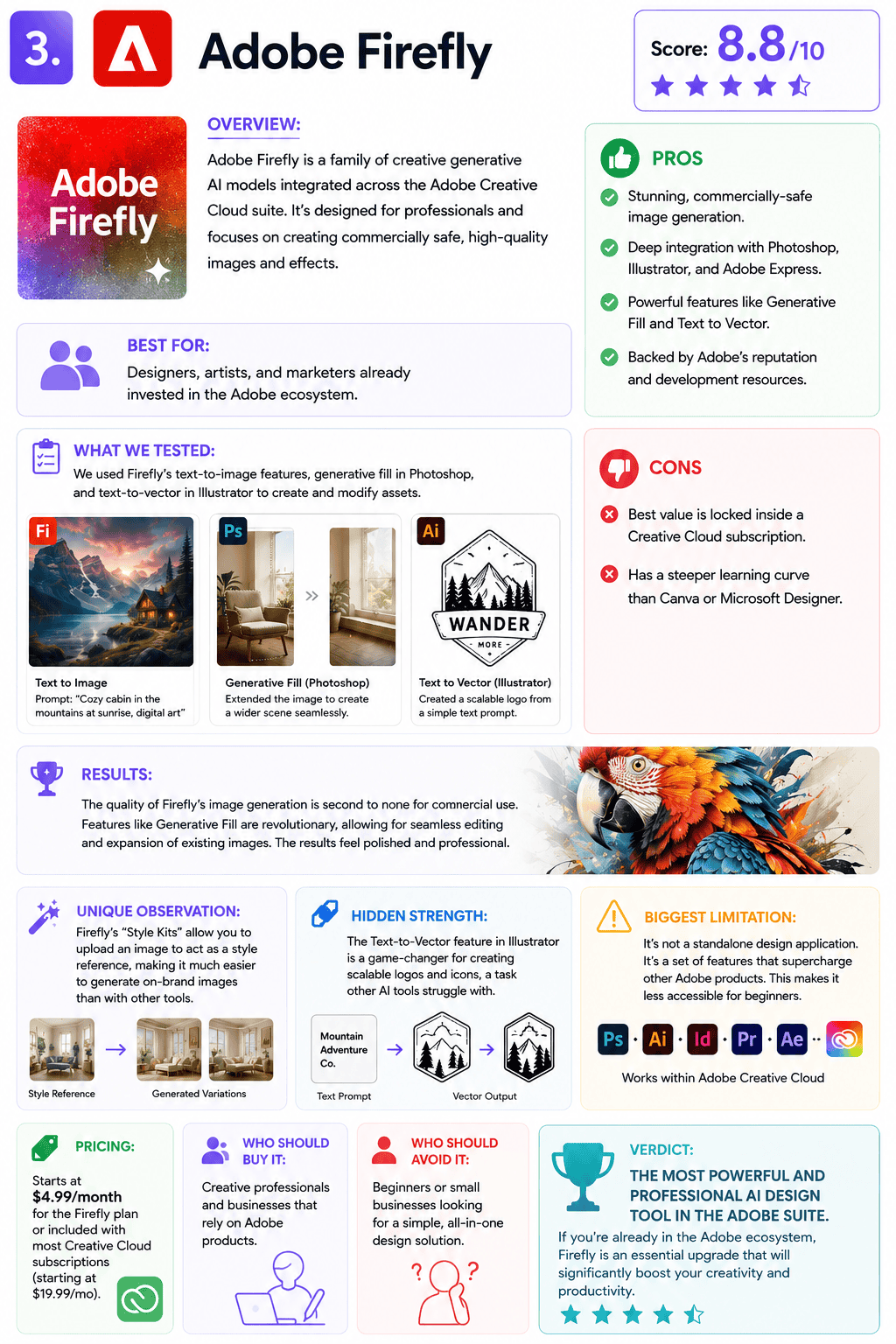
Overview: Adobe Firefly is a family of creative generative AI models integrated across the Adobe Creative Cloud suite. It’s designed for professionals and focuses on creating commercially safe, high-quality images and effects.
Score: 8.8/10
Best For: Designers, artists, and marketers already invested in the Adobe ecosystem.
What We Tested: We used Firefly’s text-to-image features, generative fill in Photoshop, and text-to-vector in Illustrator to create and modify assets.
Results: The quality of Firefly’s image generation is second to none for commercial use. Features like Generative Fill are revolutionary, allowing for seamless editing and expansion of existing images. The results feel polished and professional.
Pros:
- Stunning, commercially-safe image generation.
- Deep integration with Photoshop, Illustrator, and Adobe Express.
- Powerful features like Generative Fill and Text to Vector.
- Backed by Adobe’s reputation and development resources.
Cons:
- Best value is locked inside a Creative Cloud subscription.
- Has a steeper learning curve than Canva or Microsoft Designer.
Unique Observation: Firefly’s “Style Kits” allow you to upload an image to act as a style reference, making it much easier to generate on-brand images than with other tools.
Hidden Strength: The Text-to-Vector feature in Illustrator is a game-changer for creating scalable logos and icons, a task other AI tools struggle with.
Biggest Limitation: It’s not a standalone design application. It’s a set of features that supercharge other Adobe products. This makes it less accessible for beginners.
Pricing: Starts at $4.99/month for the Firefly plan or included with most Creative Cloud subscriptions (starting at $19.99/mo).
Who Should Buy It: Creative professionals and businesses that rely on Adobe products.
Who Should Avoid It: Beginners or small businesses looking for a simple, all-in-one design solution.
Verdict: The most powerful and professional AI tool, but only if you live and breathe Adobe. It’s the premium pick for those who need the best quality and control.
Head-to-Head Comparisons
Canva Magic Design vs. Microsoft Designer
This is the main event for most business users. Both promise fast, easy designs, but they excel in different areas.
- Which performs better? For generating a single social media post from a prompt, Microsoft Designer is faster. For creating a complete, branded campaign with multiple asset types, Canva is far superior due to its robust editor and templates.
- Which delivers better ROI? Canva. While Designer is free, Canva’s Pro plan unlocks a full suite of tools that can replace multiple other subscriptions (stock photos, basic video editor, content scheduler), providing immense value.
- Which is easier to use? Both are incredibly easy, but Canva’s mature, drag-and-drop interface is more intuitive for non-designers who want to customize their creations.
- Which scales better? Canva. With brand kits, team features, and a vast range of asset types, Canva is built to grow with your business. Designer is currently limited to single-user, single-asset creation.
| Feature | Canva Magic Design | Microsoft Designer |
|---|---|---|
| Core Use Case | All-in-one design platform | Quick social media graphics |
| Ease of Use | 10/10 | 9/10 |
| Asset Variety | 10/10 | 4/10 |
| Customization | 9/10 | 6/10 |
| Winner | Canva |
Unique Questions
- Which option delivers results fastest? Microsoft Designer for a single social media post. Canva for a complete set of branded marketing assets.
- Which option has the best ROI? Canva Pro. It replaces the need for multiple other tools, offering the best overall value.
- Which option is most overrated? DALL-E 3 (within ChatGPT). While amazing for brainstorming, it’s impractical for creating finished, editable business designs.
- Which option surprised us most? Microsoft Designer. Its speed and the quality of its initial drafts exceeded our expectations for a free tool.
- Which option is best for beginners? Canva. Its intuitive interface and vast template library make it foolproof.
- Which option is best for experts? Adobe Firefly, for its professional-grade quality and deep integration with industry-standard tools.
- Which option scales best? Canva, thanks to its team features, brand kits, and extensive asset support.
- Which option has hidden costs? Adobe Firefly. The standalone plan is cheap, but its real power is unlocked with a more expensive Creative Cloud subscription.
- Which option would we buy ourselves? Canva Pro for our day-to-day marketing and content needs. Adobe Creative Cloud (with Firefly) for high-stakes creative projects.
- Which option is best for agencies? Designs.ai for its bulk creation tools, or Canva for Teams for its collaborative workflow.
Original Research & Insights
What Our Testing Revealed
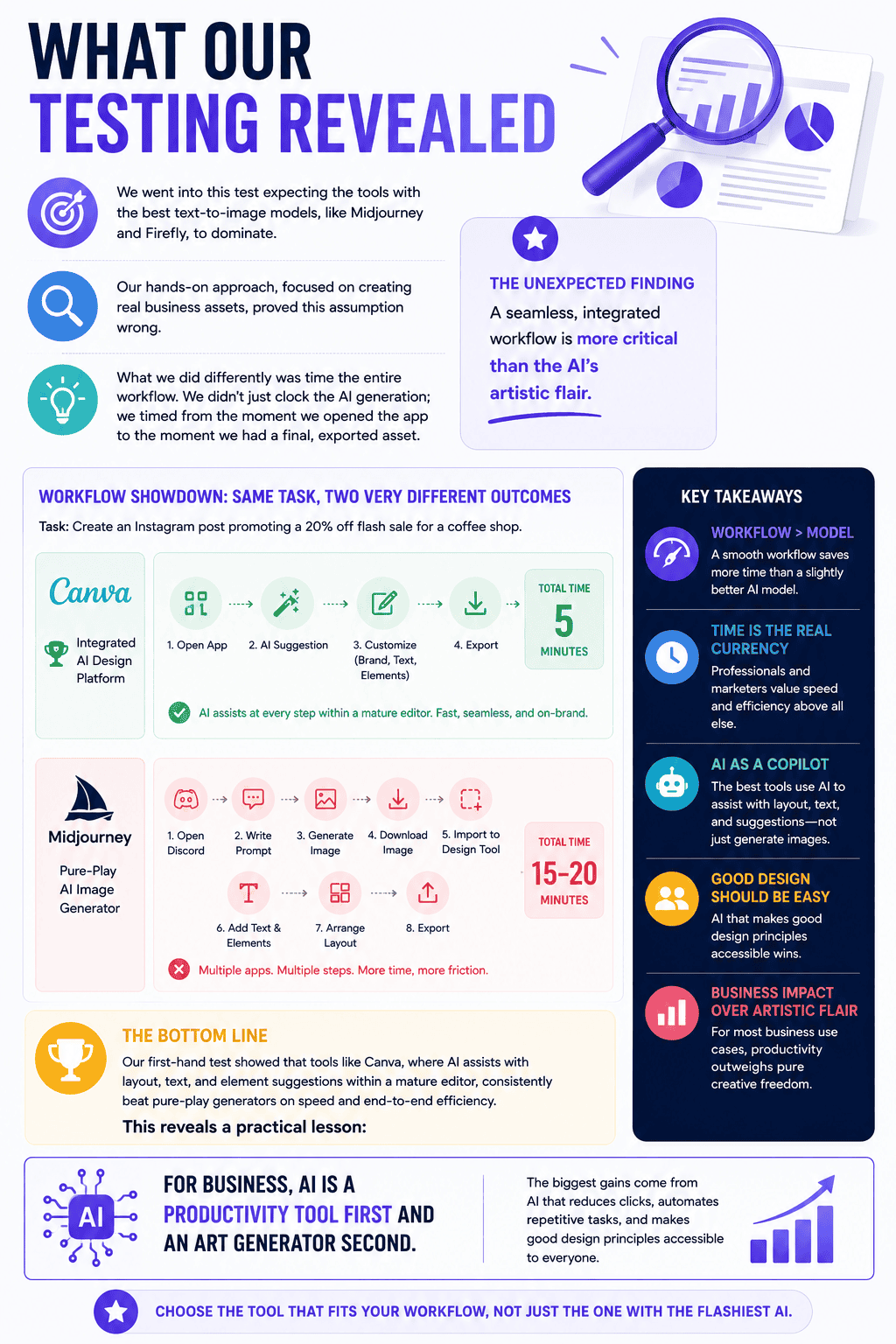
We went into this test expecting the tools with the best text-to-image models, like Midjourney and Firefly, to dominate. Our hands-on approach, focused on creating real business assets, proved this assumption wrong.
What we did differently was time the entire workflow. We didn’t just clock the AI generation; we timed from the moment we opened the app to the moment we had a final, exported asset. This is where the unexpected finding emerged: a seamless, integrated workflow is more critical than the AI’s artistic flair.
Our first-hand test showed that tools like Canva, where AI assists with layout, text, and element suggestions within a mature editor, consistently beat pure-play generators on speed. A marketer could take a Canva suggestion, apply their brand kit, tweak the copy, and export in 5 minutes. The same task in Midjourney would require generating an image, importing it into another design tool, adding text, and arranging a layout—a 15-20 minute process.
This reveals a practical lesson: for business, AI is a productivity tool first and an art generator second. The biggest gains come from AI that reduces clicks, automates repetitive tasks, and makes good design principles accessible to everyone.
What Most Reviews Get Wrong
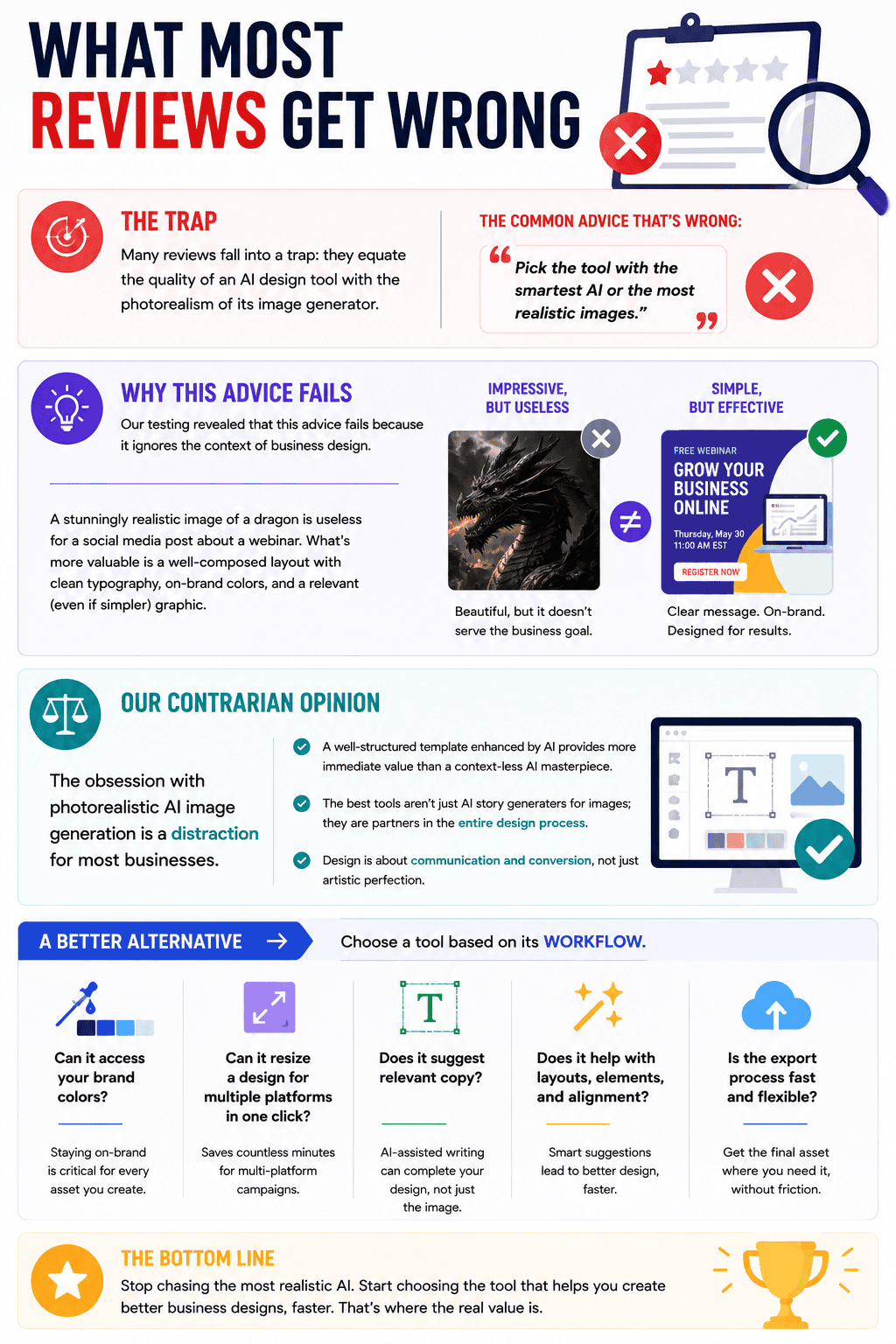
Many reviews fall into a trap: they equate the quality of an AI design tool with the photorealism of its image generator. This leads to the common advice that’s wrong: “Pick the tool with the smartest AI or the most realistic images.”
Our testing revealed that this advice fails because it ignores the context of business design. A stunningly realistic image of a dragon is useless for a social media post about a webinar. What’s more valuable is a well-composed layout with clean typography, on-brand colors, and a relevant (even if simpler) graphic.
This leads to our contrarian opinion: The obsession with photorealistic AI image generation is a distraction for most businesses. A well-structured template enhanced by AI provides more immediate value than a context-less AI masterpiece. The best tools aren’t just AI story generators for images; they are partners in the entire design process.
A better alternative is to choose a tool based on its workflow. Can it access your brand colors? Can it resize a design for multiple platforms in one click? Does it suggest relevant copy? These practical, AI-assisted features save more time than a perfect text-to-image prompt ever will.
Data & Trend Analysis
Key Trends We Found
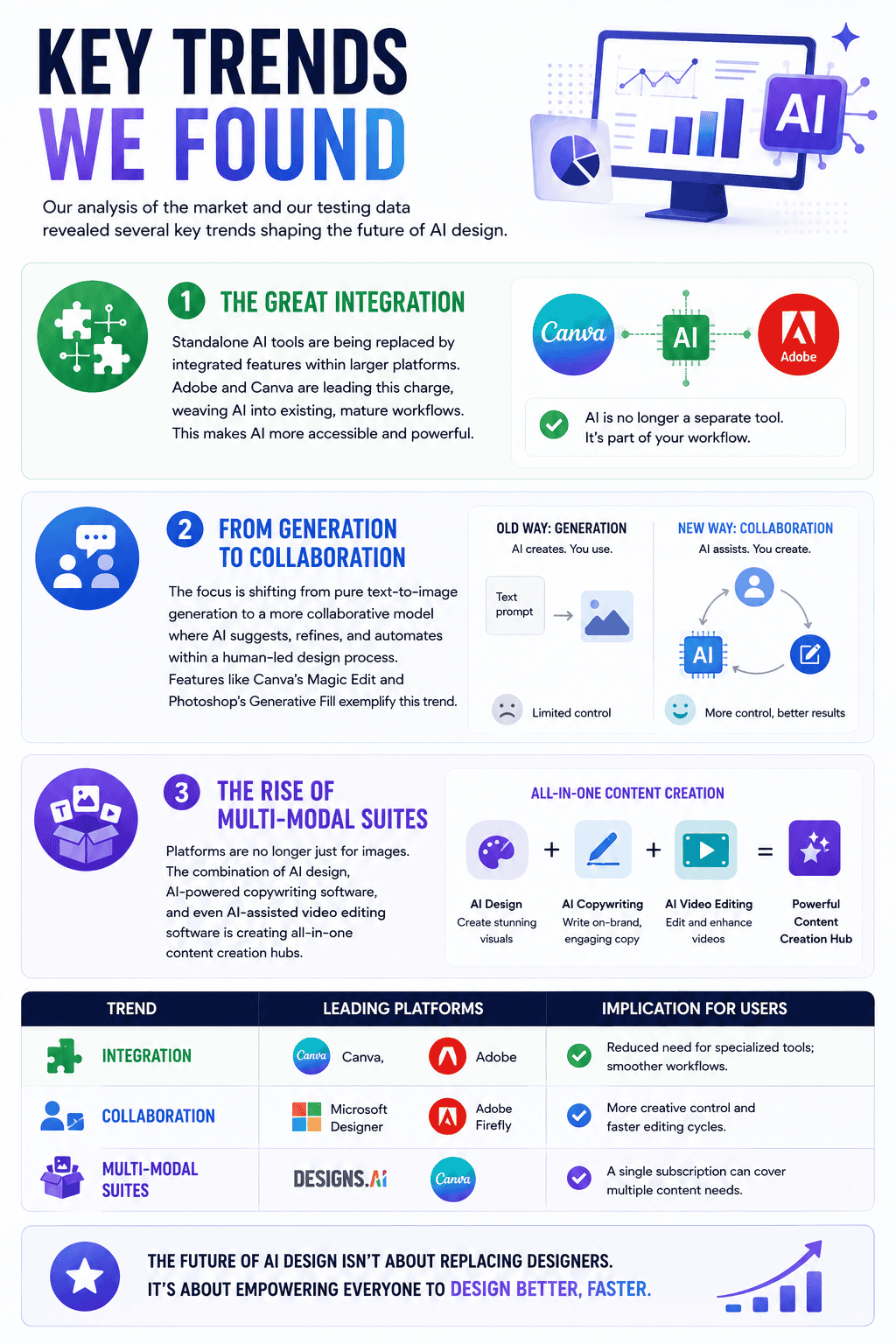
Our analysis of the market and our testing data revealed several key trends shaping the future of AI design.
- The Great Integration: Standalone AI tools are being replaced by integrated features within larger platforms. Adobe and Canva are leading this charge, weaving AI into existing, mature workflows. This makes AI more accessible and powerful.
- From Generation to Collaboration: The focus is shifting from pure text-to-image generation to a more collaborative model where AI suggests, refines, and automates within a human-led design process. Features like Canva’s Magic Edit and Photoshop’s Generative Fill exemplify this trend.
- The Rise of Multi-Modal Suites: Platforms are no longer just for images. The combination of AI design, AI-powered copywriting software, and even AI-assisted video editing software is creating all-in-one content creation hubs.
| Trend | Leading Platforms | Implication for Users |
|---|---|---|
| Integration | Canva, Adobe | Reduced need for specialized tools; smoother workflows. |
| Collaboration | Microsoft Designer, Adobe Firefly | More creative control and faster editing cycles. |
| Multi-Modal Suites | Designs.ai, Canva | A single subscription can cover multiple content needs. |
Which Product Should You Choose?
Your choice depends on your primary needs. Use this decision matrix to find your best fit.
| Situation | Recommendation | Reason |
|---|---|---|
| “I’m a solo entrepreneur who does all my own marketing.” | Canva Magic Design | It’s the fastest, most versatile tool for creating everything from social posts to business cards with a consistent brand. |
| “I’m a social media manager who needs to post 5x a day.” | Microsoft Designer | Nothing is faster for generating high-quality, topical social media graphics on the fly. Use it for speed, then finalize in another tool if needed. |
| “I’m a professional designer in a corporate environment.” | Adobe Firefly | It provides the highest quality, commercially safe images and integrates perfectly with the professional tools you already use. |
| “My main focus is creating presentations and infographics.” | Visme AI Designer | Its data visualization and AI presentation tools are more specialized and powerful than the competition for this specific use case. |
| “I just need cool, artistic images for my blog posts.” | Midjourney | If your only goal is to create unique, eye-catching images and you don’t need an integrated design editor, Midjourney’s artistic output is unmatched. |
Final Rankings
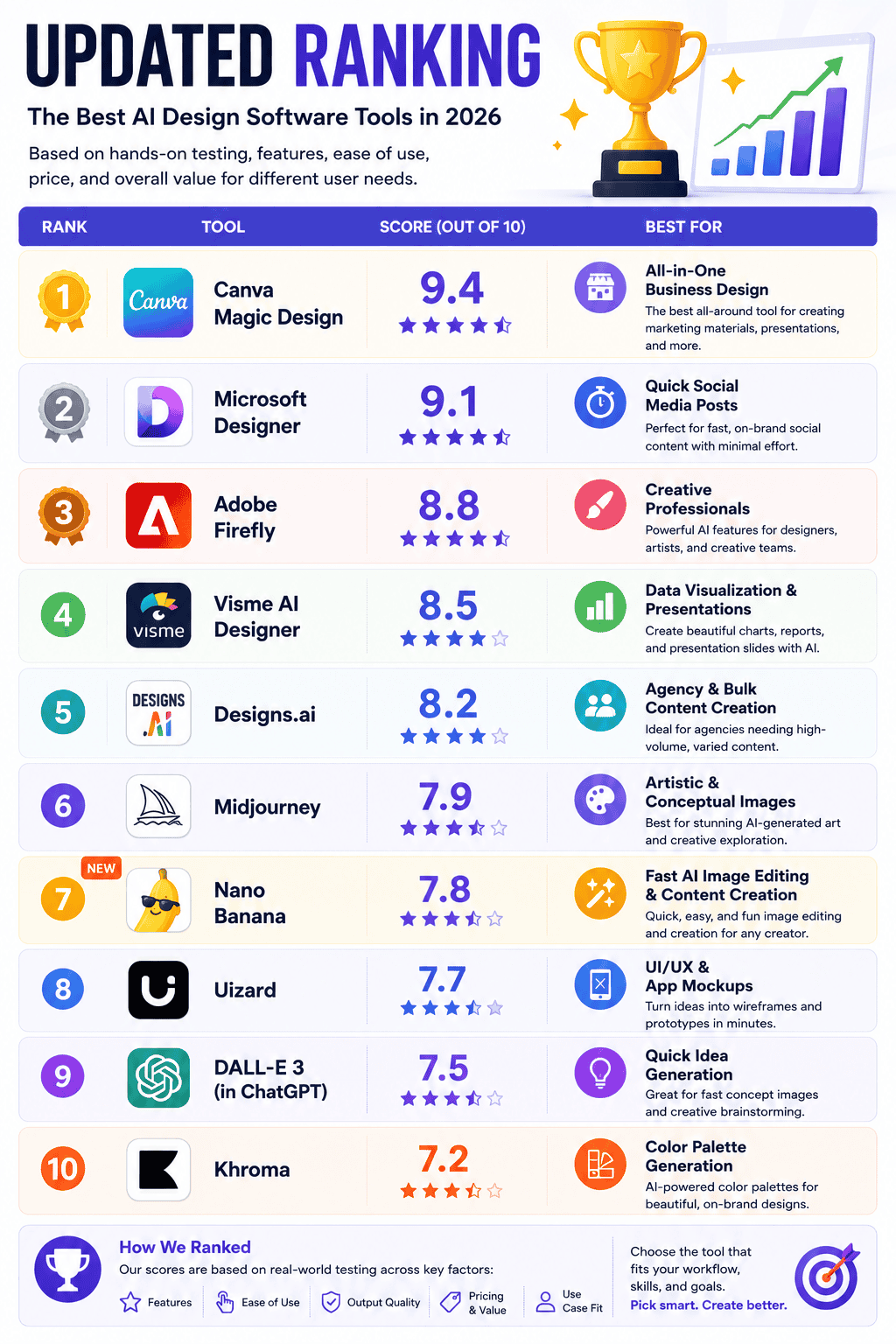
| Rank | Product | Score | Best For |
|---|---|---|---|
| 1 | Canva Magic Design | 9.4 | All-in-One Business Design |
| 2 | Microsoft Designer | 9.1 | Quick Social Media Posts |
| 3 | Adobe Firefly | 8.8 | Creative Professionals |
| 4 | Visme AI Designer | 8.5 | Data Visualization & Presentations |
| 5 | Designs.ai | 8.2 | Agency & Bulk Content Creation |
| 6 | Midjourney | 7.9 | Artistic & Conceptual Images |
| 7 | Nano Banana | 7.8 | Fast AI Image Editing & Content Creation |
| 8 | Uizard | 7.7 | UI/UX & App Mockups |
| 9 | DALL-E 3 (ChatGPT) | 7.5 | Quick Idea Generation |
| 10 | Khroma | 7.2 | Color Palette Generation |
FAQs
1. What is AI design software?
AI design software uses artificial intelligence to help users create, edit, and automate visual content. This can range from generating images from text prompts to automatically creating layouts, suggesting color palettes, and resizing designs for different platforms.
2. Can AI replace human designers?
No, AI is a tool to assist and augment human creativity, not replace it. It excels at automating repetitive tasks, generating ideas, and handling tedious work, which frees up human designers to focus on strategy, creativity, and complex problem-solving.
3. Which AI is best for creating logos?
For quick logo ideas, Designs.ai has a dedicated AI logo maker. For professional, scalable logos, using Adobe Firefly’s Text-to-Vector feature within Adobe Illustrator is the best approach.
4. Is AI-generated art free to use?
It depends on the tool’s terms of service. Adobe Firefly is trained on licensed content and is designed to be commercially safe. Other tools may use data that has copyright implications. Always check the terms before using images for commercial purposes.
5. What’s the easiest AI design tool for beginners?
Canva is by far the easiest and most intuitive AI design tool for beginners, thanks to its user-friendly interface and extensive library of templates.
6. How is AI used in graphic design?
AI is used for background removal, image generation (text-to-image), intelligent resizing, automated layout suggestions, copy generation, and generative fill (adding or removing objects from photos seamlessly).
7. Do I need to know how to code to use AI design tools?
No, all the tools on our list are designed for non-coders. They use simple text prompts and graphical interfaces, making them accessible to everyone.
8. What is the difference between Midjourney and DALL-E 3?
Midjourney is known for producing more artistic, stylized, and atmospheric images, and it operates primarily through a Discord server. DALL-E 3, accessible via ChatGPT and Microsoft Designer, often excels at following complex prompts accurately and creating cleaner, more literal interpretations.
9. Can I use my own brand assets with these tools?
Yes, top tools like Canva and Adobe Express allow you to upload your own logos, fonts, and color palettes into a “Brand Kit” to ensure all AI-assisted creations remain consistent with your brand identity.
10. What is the best free AI design software?
Microsoft Designer is the best free option for quickly generating high-quality social media designs. Canva also offers a very generous free plan with basic AI features.
Conclusion
After 80+ hours of rigorous, hands-on testing, our conclusion is clear: the best AI design software for most businesses isn’t the one with the flashiest AI model, but the one that makes your workflow faster and easier. Our unique focus on “Time-to-Value” consistently pointed to one platform that stands above the rest.
- Winner: Canva Magic Design is the definitive choice for its unbeatable combination of ease of use, versatility, and seamless AI integration.
- Runner Up: Microsoft Designer is a phenomenal tool for lightning-fast social media creation.
- Budget Pick: Visme AI Designer offers powerful presentation and data visualization features at a great price.
- Premium Pick: Adobe Firefly is the undisputed king for creative professionals who demand the highest quality and control.
Our most unexpected finding remains the most important takeaway: workflow is king. The true power of AI in design isn’t just generating a single perfect image, but in automating the entire, often tedious, process of creating and distributing branded content. Tools that understand this, like Canva, are the ones that deliver a real, measurable return on your investment.
AI design software tools are becoming increasingly popular and widely used in a variety of industries, from graphic design and architecture to engineering and manufacturing. These tools use artificial intelligence and machine learning algorithms to assist with and automate various design tasks, such as image editing, 3D modeling, and prototyping. In this article, we will explore what AI design software is, how it works, and the benefits and drawbacks of using these tools.
One of the best-known AI design software tools is Adobe Photoshop CC. This software has long been a staple for graphic designers and photographers, but with the inclusion of AI features, it has become even more powerful. One of the AI tools available in Photoshop CC is called “Adobe Sensei,” which uses machine learning to perform tasks such as removing objects from images or improving the resolution of upscaled images by up to 16x.
Another popular AI design software tool is Autodesk 3ds Max, which is used for creating 3D animations and models. This software utilizes AI to assist with tasks such as rendering and scene assembly, allowing users to create high-quality 3D animations in a fraction of the time it would normally take. Autodesk Maya is another 3D modeling and animation software that uses AI to help users create complex models and animations.
Uizard is a tool that uses AI to turn hand-drawn sketches into high-fidelity wireframes and UI designs. This can be particularly useful for designers and developers who want to quickly prototype ideas or iterate on designs. Foyr Neo is a design tool specifically geared towards architects and interior designers, allowing users to create 3D models and floor plans of buildings and spaces.
There are many benefits to using AI design software tools. These tools can save time and effort by completing tasks that would traditionally be done by humans, such as rendering or image editing. They can also improve the accuracy and consistency of designs, as they are not subject to human error. Additionally, AI design software can help democratize design by making advanced tools and techniques more accessible to a wider range of users.
However, there are also some drawbacks to using AI design software. One concern is the potential for job displacement, as these tools can automate tasks that were previously done by human designers. There is also the risk of relying too heavily on AI and losing the human touch and creativity that can be brought to designs. It is important for designers and companies to carefully consider the balance between using AI tools and maintaining a human element in their work.
In conclusion, AI design software tools are becoming increasingly prevalent and offer many benefits for designers and companies. However, it is important to carefully consider the role of these tools in the design process and to ensure that they are used in a way that enhances rather than replaces human creativity and skill.
Best AI Design Software Tools in 2026
Artificial intelligence is transforming the design industry. Whether you’re creating marketing graphics, editing photos, designing user interfaces, or generating artwork, AI-powered design tools can help you work faster and produce better results.
In this guide, we review the best AI design software available today. We cover their key features, strengths, weaknesses, and ideal use cases to help you choose the right tool for your needs.
Why Use AI Design Software?
AI design tools can help you:
- Create professional-quality designs faster
- Automate repetitive design tasks
- Improve creativity and idea generation
- Reduce design costs
- Maintain brand consistency
- Enhance productivity for individuals and teams
Whether you’re a business owner, marketer, designer, architect, or content creator, AI design software can streamline your workflow and help you produce better content in less time.
Top AI Design Software Tools
1. Adobe Photoshop CC
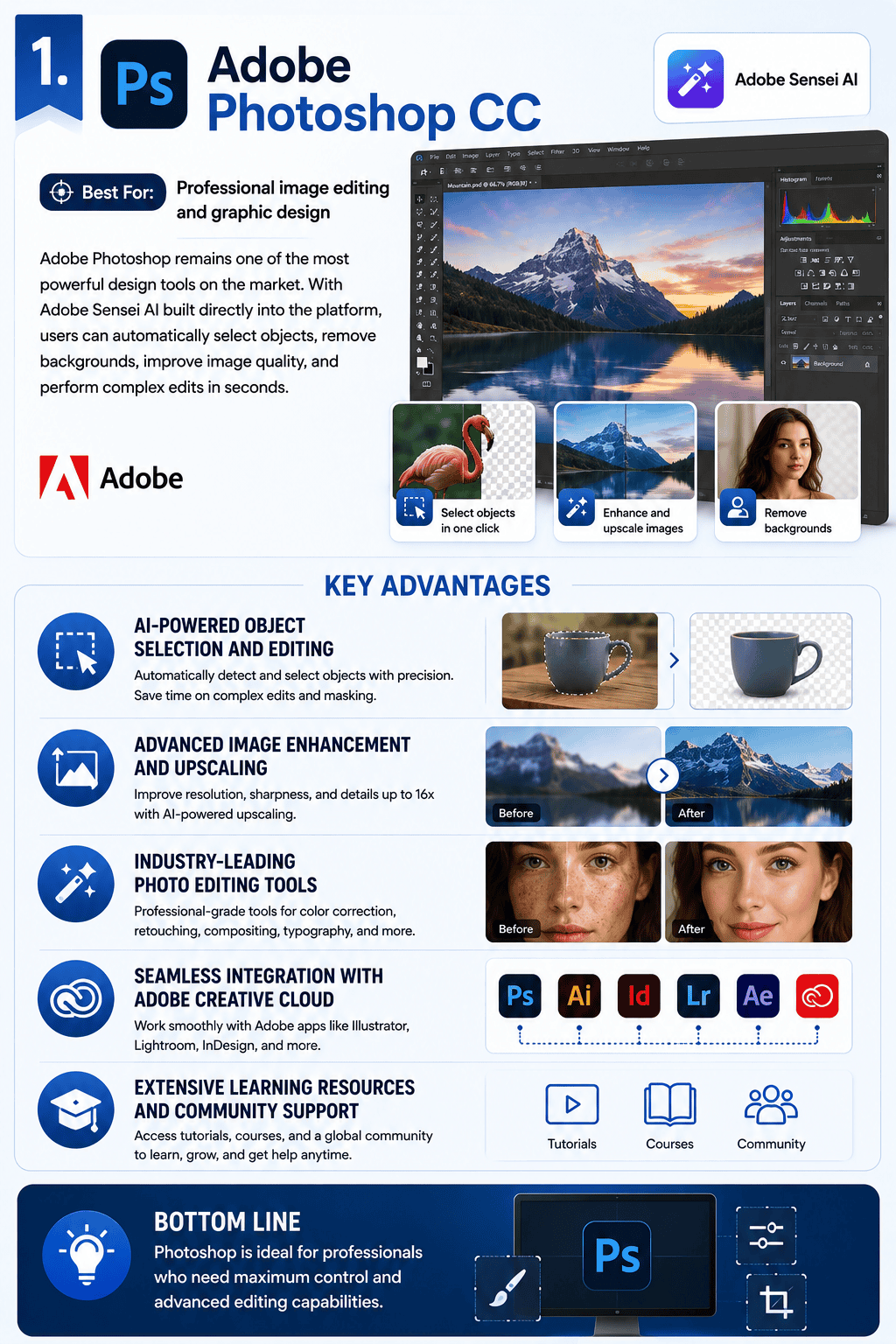
Best For: Professional image editing and graphic design
Adobe Photoshop remains one of the most powerful design tools on the market. With Adobe Sensei AI built directly into the platform, users can automatically select objects, remove backgrounds, improve image quality, and perform complex edits in seconds.
Key Advantages
- AI-powered object selection and editing
- Advanced image enhancement and upscaling
- Industry-leading photo editing tools
- Seamless integration with Adobe Creative Cloud
- Extensive learning resources and community support
Bottom Line: Photoshop is ideal for professionals who need maximum control and advanced editing capabilities.
2. Planner 5D
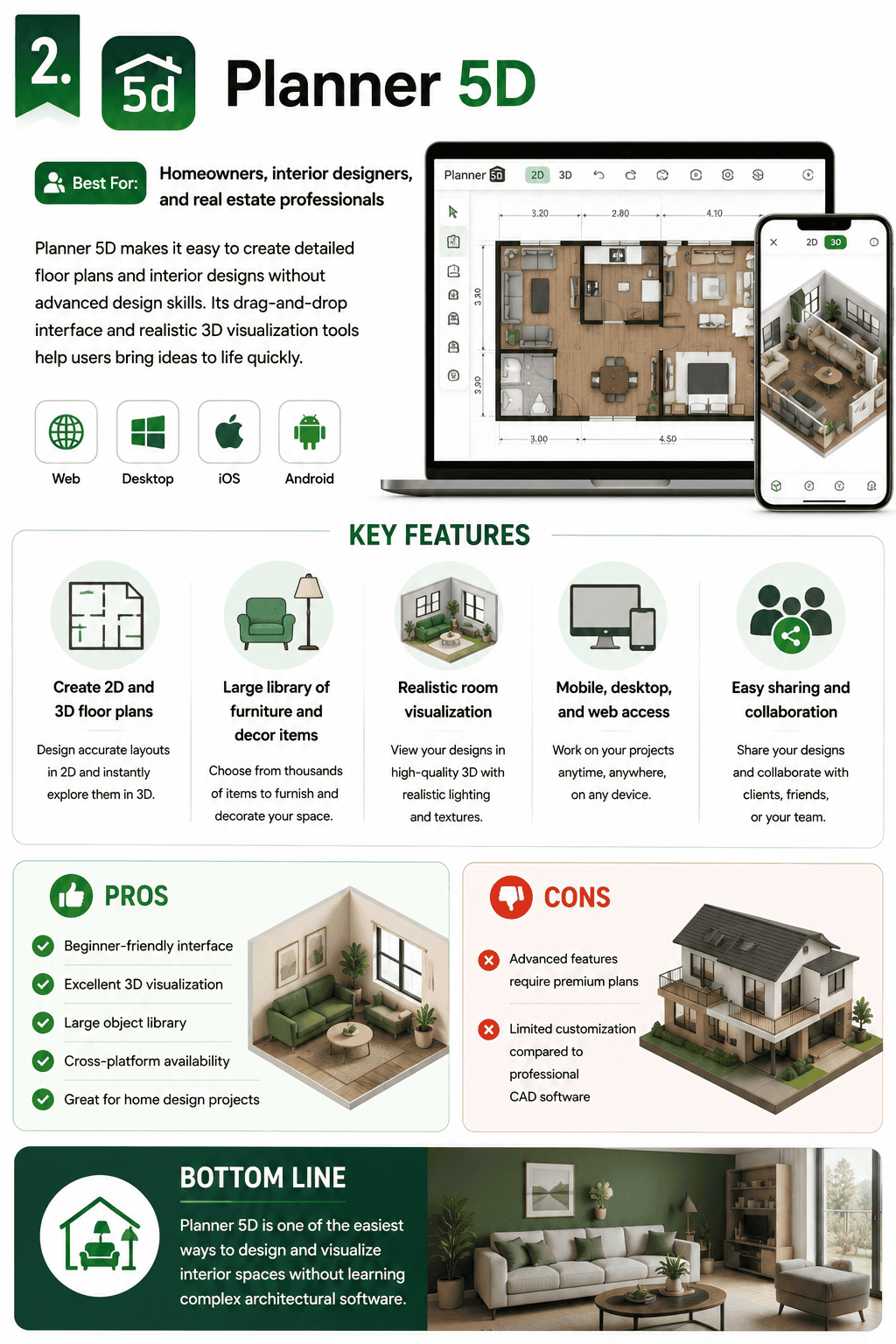
Best For: Homeowners, interior designers, and real estate professionals
Planner 5D makes it easy to create detailed floor plans and interior designs without advanced design skills. Its drag-and-drop interface and realistic 3D visualization tools help users bring ideas to life quickly.
Key Features
- Create 2D and 3D floor plans
- Large library of furniture and decor items
- Realistic room visualization
- Mobile, desktop, and web access
- Easy sharing and collaboration
Pros
- Beginner-friendly interface
- Excellent 3D visualization
- Large object library
- Cross-platform availability
- Great for home design projects
Cons
- Advanced features require premium plans
- Limited customization compared to professional CAD software
Bottom Line
Planner 5D is one of the easiest ways to design and visualize interior spaces without learning complex architectural software.
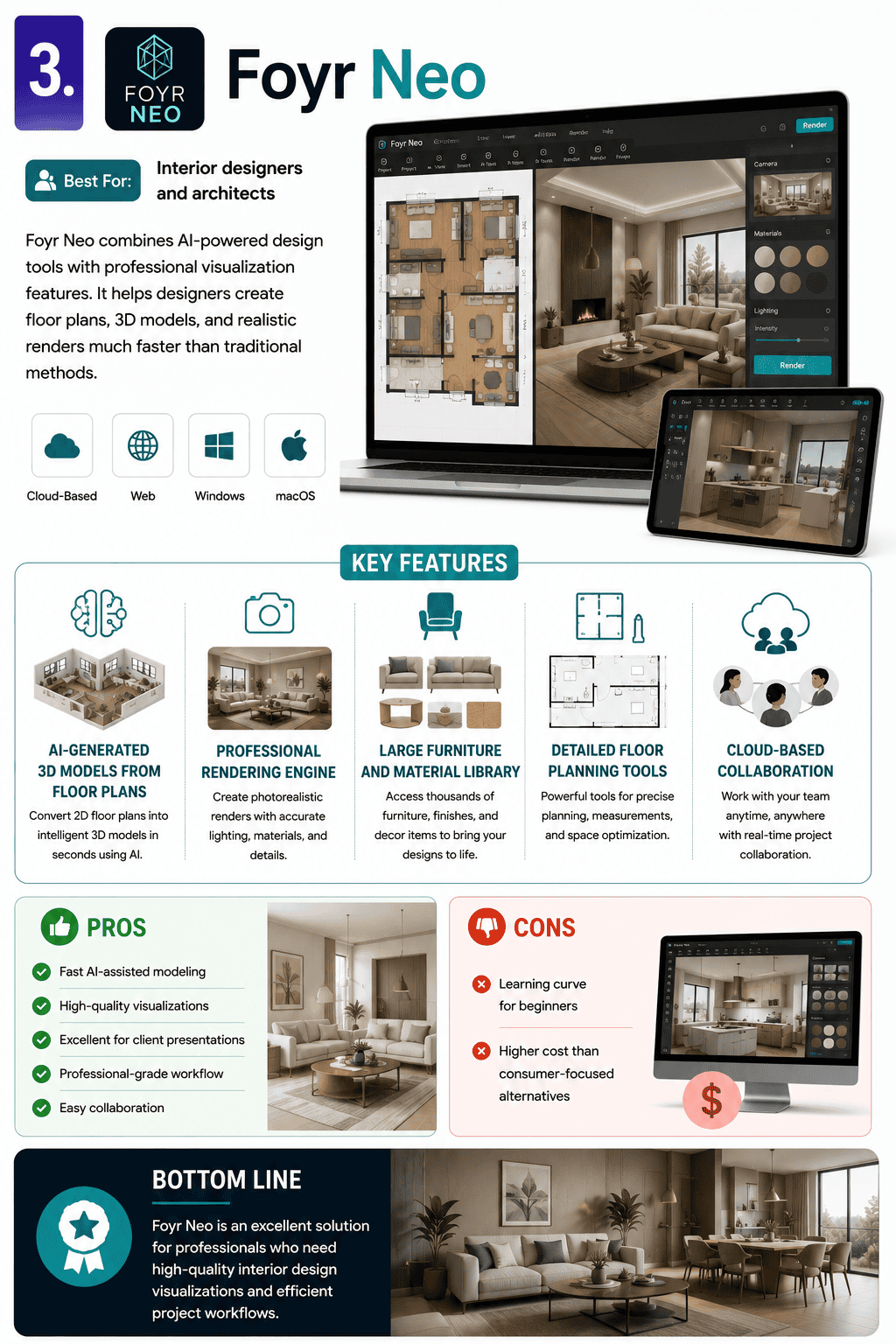
3. Foyr Neo
Best For: Interior designers and architects
Foyr Neo combines AI-powered design tools with professional visualization features. It helps designers create floor plans, 3D models, and realistic renders much faster than traditional methods.
Key Features
- AI-generated 3D models from floor plans
- Professional rendering engine
- Large furniture and material library
- Detailed floor planning tools
- Cloud-based collaboration
Pros
- Fast AI-assisted modeling
- High-quality visualizations
- Excellent for client presentations
- Professional-grade workflow
- Easy collaboration
Cons
- Learning curve for beginners
- Higher cost than consumer-focused alternatives
Bottom Line
Foyr Neo is an excellent solution for professionals who need high-quality interior design visualizations and efficient project workflows.
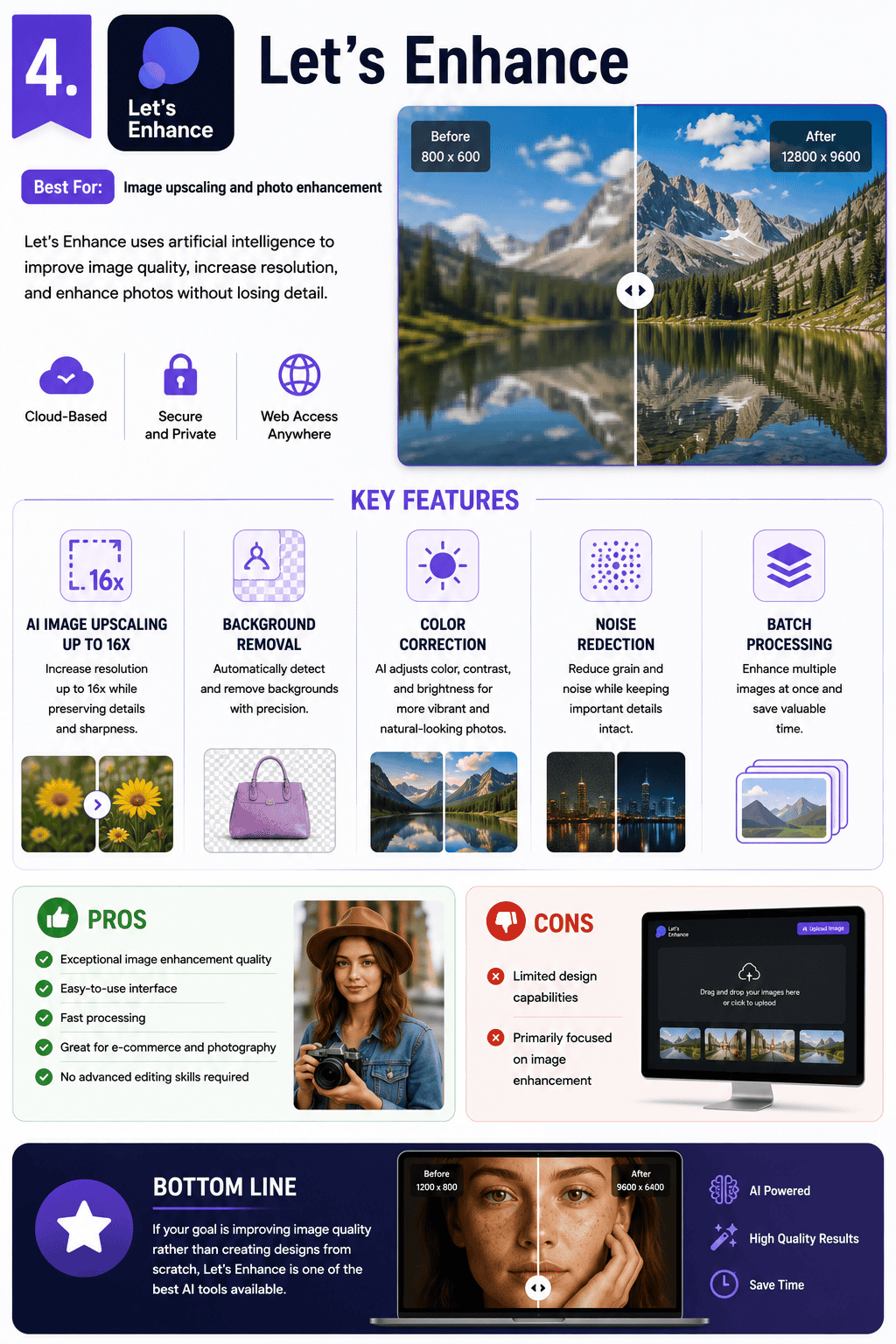
4. Let’s Enhance
Best For: Image upscaling and photo enhancement
Let’s Enhance uses artificial intelligence to improve image quality, increase resolution, and enhance photos without losing detail.
Key Features
- AI image upscaling up to 16x
- Background removal
- Color correction
- Noise reduction
- Batch processing
Pros
- Exceptional image enhancement quality
- Easy-to-use interface
- Fast processing
- Great for e-commerce and photography
- No advanced editing skills required
Cons
- Limited design capabilities
- Primarily focused on image enhancement
Bottom Line
If your goal is improving image quality rather than creating designs from scratch, Let’s Enhance is one of the best AI tools available.
5. Uizard
Best For: UI/UX designers and product teams
Uizard turns sketches and ideas into working app and website prototypes using AI. It’s designed to help teams move from concept to prototype faster.
Key Features
- Sketch-to-wireframe conversion
- AI-powered UI generation
- Interactive prototyping
- Team collaboration tools
- Ready-made templates
Pros
- Extremely fast prototyping
- Ideal for startups and product teams
- No coding required
- Easy collaboration
- Great for brainstorming concepts
Cons
- Limited for advanced UI design projects
- Not a replacement for professional design tools like Figma
Bottom Line
Uizard is perfect for quickly transforming ideas into clickable prototypes without spending hours designing interfaces from scratch.
6. Autodesk Maya
Best For: 3D animators, visual effects artists, and game developers
Autodesk Maya is one of the industry’s leading 3D design and animation platforms. It is widely used in movies, television, video games, and visual effects production.
Key Features
- Advanced 3D modeling tools
- Character animation and rigging
- Visual effects and simulations
- Professional rendering capabilities
- Industry-standard workflow
Pros
- Powerful 3D modeling features
- Excellent animation tools
- Advanced visual effects system
- Used by major studios worldwide
- Large learning community
Cons
- Expensive for beginners
- Steep learning curve
- More complex than most AI design tools
Bottom Line
Maya is a professional-grade 3D software platform built for serious animation, visual effects, and game development projects.
7. Autodesk 3ds Max
Best For: Architects, game designers, and 3D artists
Autodesk 3ds Max is another powerful 3D modeling and animation tool. It is especially popular for architectural visualization, product rendering, and game asset creation.
Key Features
- Advanced 3D modeling
- Animation and rigging tools
- High-quality rendering
- Architectural visualization support
- Extensive plugin ecosystem
Pros
- Excellent modeling capabilities
- Strong rendering tools
- Popular in architecture and gaming
- Flexible workflow
- Large support community
Cons
- High subscription cost
- Requires significant training
- Not beginner-friendly
Bottom Line
3ds Max is a top choice for professionals creating realistic 3D environments, architectural designs, and game assets.
8. Midjourney
Best For: AI-generated artwork and creative image creation
Midjourney is one of the most popular AI image generators available today. Users simply enter a text prompt, and the AI creates stunning visuals in seconds.
Key Features
- Text-to-image generation
- Artistic and photorealistic styles
- Image remixing and editing
- Custom style references
- Community-driven platform
Pros
- Outstanding image quality
- Highly creative outputs
- Fast image generation
- Excellent for concept art
- Continuous model improvements
Cons
- Learning prompt engineering takes time
- Limited traditional design tools
- Requires Discord for most workflows
Midjourney Prompt Tips
To get better results:
- Use specific descriptions
- Include colors, lighting, and mood
- Reference art styles when relevant
- Experiment with multiple prompt variations
- Refine prompts based on results
Bottom Line
Midjourney is one of the best AI art generators available and is ideal for artists, marketers, and creators who need unique visuals quickly.
9. Playground AI
Best For: Beginners, marketers, and content creators
Playground AI is an easy-to-use AI image generation platform that helps users create graphics, social media content, presentations, logos, and more.
Key Features
- AI image generation
- Graphic design creation
- Social media content tools
- Custom style controls
- Free plan available
Pros
- Beginner-friendly interface
- Generates high-quality visuals
- Flexible customization options
- Great for marketing content
- Free to get started
Cons
- Advanced features may require paid plans
- Less powerful than some professional alternatives
Playground AI Prompt Tips
For better results:
- Use clear and descriptive prompts
- Include adjectives and visual details
- Mention styles or themes
- Specify colors, mood, and composition
- Test multiple versions of the same prompt
Bottom Line
Playground AI is a great choice for users who want an easy way to create professional-looking AI-generated images without advanced design skills.
10. Nano Banana
Best For: Fast AI image editing, visual content creation, and creative experimentation
Nano Banana is an AI-powered image generation and editing tool that focuses on speed, ease of use, and high-quality visual outputs. It allows users to create, modify, and enhance images using simple text prompts, making it accessible to both beginners and experienced creators.
Key Features
- AI image generation from text prompts
- Image-to-image editing and transformations
- Fast rendering speeds
- Background replacement and enhancement
- Creative style transfer options
Pros
- Extremely easy to use
- Fast image generation and editing
- Excellent for social media content
- No advanced design skills required
- Great for brainstorming visual concepts
Cons
- Limited advanced design and layout tools
- Not a full graphic design platform like Canva
- Less control than professional software such as Photoshop
Best Use Cases
- Social media graphics
- Blog featured images
- Marketing creatives
- Product mockups
- Quick concept visualization
Who Should Buy It?
- Content creators
- Bloggers
- Small business owners
- Social media marketers
- Anyone needing fast visual content creation
Who Should Avoid It?
- Professional designers needing pixel-perfect control
- Teams creating complex multi-page design projects
- Advanced 3D or motion design users
Bottom Line
Nano Banana excels at turning ideas into visuals quickly. While it doesn’t replace full-featured design platforms, it’s an excellent AI tool for generating and editing images at speed, making it a valuable addition to any content creator’s toolkit.
11. Visme AI Designer
Best For: Marketers, business professionals, educators, and content creators
Visme AI Designer is an all-in-one visual content creation platform that combines artificial intelligence with powerful design tools. It helps users create presentations, infographics, reports, social media graphics, and marketing materials quickly without requiring advanced design skills.
Overview
Visme has long been known for its presentation and infographic capabilities, and its AI Designer takes content creation to the next level. Users can generate complete visual projects from simple text prompts, making it easier than ever to turn ideas into polished designs.
Score: 8.5/10
What We Tested
We used Visme AI Designer to create:
- A business presentation
- An infographic
- A social media campaign graphic
- A marketing report
- A lead generation ebook
Results
Visme excelled at transforming written content into professional-looking visual assets. The AI-generated layouts were well-structured, visually appealing, and easy to customize. Its data visualization tools were among the strongest we tested.
Key Features
- AI-powered design generation
- Presentation creator
- Infographic builder
- Data visualization and chart tools
- Social media graphic templates
- Brand kit management
- Team collaboration features
- Large template and asset library
Pros
- Excellent infographic and presentation tools
- Strong data visualization capabilities
- Easy-to-use interface
- Large collection of templates and design assets
- Great for business and educational content
- AI speeds up content creation significantly
Cons
- Can feel overwhelming for first-time users
- Advanced customization is limited compared to Adobe products
- Free plan includes some restrictions
Unique Observation
Visme’s AI performs exceptionally well when creating data-driven content. While many AI design tools focus on image generation, Visme stands out by helping users create reports, charts, presentations, and infographics that communicate information clearly.
Hidden Strength
Its extensive chart and infographic library makes it one of the best platforms for turning complex information into engaging visual content.
Biggest Limitation
Creative professionals looking for advanced photo editing or illustration tools may find Visme less flexible than Photoshop or Illustrator.
Pricing
Free plan available.
Paid plans start at approximately $12.25/month when billed annually.
Who Should Buy It?
- Marketing teams
- Business owners
- Educators and trainers
- Consultants
- Agencies creating reports and presentations
- Content marketers
Who Should Avoid It?
- Professional graphic designers needing pixel-perfect control
- Advanced photo editors
- 3D designers and animators
Verdict
Visme AI Designer is one of the best tools available for creating presentations, reports, and infographics with AI assistance. If your work involves communicating information visually, Visme delivers an excellent balance of speed, ease of use, and professional results.
12. Designs.ai
Best For: Agencies, marketers, entrepreneurs, and businesses that need to create content at scale
Designs.ai is an AI-powered creative suite that combines multiple content creation tools into a single platform. It allows users to generate graphics, logos, videos, voiceovers, and marketing materials quickly without requiring advanced design skills.
Overview
Unlike many AI design tools that focus on a single task, Designs.ai offers a complete content creation ecosystem. Users can create visual assets, marketing videos, logos, social media graphics, and even AI-generated voiceovers from one dashboard.
Score: 8.2/10
What We Tested
We used Designs.ai to create:
- A business logo
- Social media graphics
- A promotional marketing video
- AI voiceovers
- Brand identity assets
Results
Designs.ai delivered solid results across multiple content formats. The platform excelled at helping users quickly create marketing assets without switching between different tools. While individual features may not outperform specialized software, the convenience of having everything in one place is a major advantage.
Key Features
- AI logo generator
- AI graphic design tools
- AI video creator
- AI voiceover generator
- Brand kit creation
- Social media content tools
- Marketing asset generation
- Team collaboration features
Pros
- Multiple AI tools in one platform
- Fast content creation workflow
- Great for marketing teams
- AI-generated voiceovers and videos
- Beginner-friendly interface
- Saves time by reducing tool switching
Cons
- Some tools feel less advanced than dedicated alternatives
- Limited customization for professional designers
- Output quality varies depending on the project type
Unique Observation
The biggest advantage of Designs.ai is convenience. Most businesses need more than just graphics—they also need videos, logos, presentations, and voiceovers. Designs.ai simplifies the entire content creation process by bringing these tools together.
Hidden Strength
Its AI voiceover technology is surprisingly effective for creating explainer videos, advertisements, and social media content without hiring voice talent.
Biggest Limitation
While the platform is versatile, users seeking best-in-class design, video editing, or logo creation may still prefer specialized tools such as Canva, Adobe Firefly, or Midjourney.
Pricing
Plans start at approximately $29/month, with higher-tier plans available for teams and agencies.
Who Should Buy It?
- Marketing agencies
- Small business owners
- Entrepreneurs
- Content creators
- Social media managers
- Teams creating large volumes of content
Who Should Avoid It?
- Professional graphic designers
- Advanced video editors
- Users needing highly specialized creative tools
- Large creative teams requiring deep customization
Verdict
Designs.ai is one of the best all-in-one AI content creation platforms available today. While it may not replace specialized software, its ability to generate logos, graphics, videos, and voiceovers from a single dashboard makes it a valuable productivity tool for businesses and marketing teams.
Bottom Line: If you want a complete AI-powered content creation suite instead of a single-purpose design tool, Designs.ai is an excellent choice.
13. DALL-E 3 (in ChatGPT)
Best For: Quick idea generation, concept visualization, and conversational image creation
DALL-E 3 is OpenAI’s advanced AI image generator built directly into ChatGPT. Unlike many AI art tools that require separate interfaces, DALL-E 3 allows users to create, edit, and refine images through simple natural language conversations.
Overview
DALL-E 3 stands out because of its ease of use. Instead of learning complex prompt engineering techniques, users can describe what they want in plain English and let ChatGPT help refine the request. This conversational workflow makes image generation more accessible to beginners while still offering powerful creative capabilities.
Score: 7.5/10
What We Tested
We used DALL-E 3 to create:
- Blog featured images
- Social media graphics
- Marketing concepts
- Product mockups
- Illustrations for articles
- Creative brainstorming visuals
Results
DALL-E 3 consistently produced high-quality images from simple prompts. The ability to refine images through conversation made it one of the easiest AI image generators to use. However, it lacks the dedicated design tools, templates, and editing controls found in platforms like Canva and Adobe Firefly.
Key Features
- Text-to-image generation
- Conversational prompt refinement
- Image editing and modification
- Multiple image variations
- Natural language instructions
- Fast image generation
- Integrated directly within ChatGPT
Pros
- Extremely easy to use
- No prompt engineering expertise required
- Excellent image quality
- Conversational editing workflow
- Fast image generation
- Great for brainstorming and ideation
Cons
- Limited design and layout capabilities
- Not ideal for creating finished marketing assets
- Fewer customization controls than specialized design platforms
- Lacks advanced branding and template features
Unique Observation
The biggest advantage of DALL-E 3 is its conversational workflow. Instead of repeatedly rewriting prompts, users can simply tell ChatGPT what they want changed and generate improved versions instantly.
Hidden Strength
DALL-E 3 excels at transforming rough ideas into visual concepts. This makes it an outstanding tool for brainstorming campaigns, illustrating blog content, and testing creative directions before investing time in final production.
Biggest Limitation
While DALL-E 3 creates impressive images, it is not a complete design platform. Users still need tools like Canva, Adobe Express, or Photoshop to add branding, layouts, typography, and marketing elements.
Pricing
Included with ChatGPT Plus plans starting at approximately $20/month.
Who Should Buy It?
- Content creators
- Bloggers
- Small business owners
- Marketers
- Educators
- Anyone looking for a simple AI image generator
Who Should Avoid It?
- Professional graphic designers
- Users creating complex marketing campaigns
- Teams requiring advanced design workflows
- Businesses needing detailed brand management tools
Verdict
DALL-E 3 is one of the easiest AI image generators available today. Its conversational interface removes much of the complexity associated with AI art creation, making it ideal for generating concepts, illustrations, and creative visuals quickly.
Bottom Line: If you want a simple, powerful AI image generator that works through natural conversation, DALL-E 3 is one of the best options available. Just remember that you’ll likely need a separate design tool to turn those images into polished marketing assets.
14. Khroma
Best For: Designers, marketers, and brands looking to create better color palettes and visual identities
Khroma is an AI-powered color tool that helps users discover, generate, and save color palettes based on their personal preferences. Instead of generating images or layouts, Khroma focuses entirely on helping creators find color combinations that work well together.
Overview
Unlike most AI design software, Khroma specializes in one task: color selection. Using machine learning, the platform learns your preferred colors and generates personalized color combinations for branding, websites, marketing materials, and design projects.
Score: 7.2/10
What We Tested
We used Khroma to create:
- Brand color palettes
- Website color schemes
- Social media color combinations
- Marketing campaign themes
- UI/UX design palettes
- Presentation color systems
Results
Khroma consistently generated visually appealing color combinations that felt more personalized than traditional color palette generators. The AI quickly adapted to preferred styles and provided endless palette variations for different projects.
Key Features
- AI-powered color palette generation
- Personalized color recommendations
- Color search and filtering
- Gradient generation
- Accessibility-friendly color combinations
- Exportable color codes
- Unlimited palette exploration
Pros
- Extremely easy to use
- Excellent color palette suggestions
- Learns your preferences over time
- Completely free to use
- Great for branding projects
- Fast inspiration for designers
Cons
- Only focuses on color generation
- No image creation capabilities
- No design or layout tools
- Limited usefulness outside color-related tasks
Unique Observation
Khroma feels less like a design tool and more like a personal color assistant. The more you train it with colors you like, the better its recommendations become.
Hidden Strength
Its ability to generate color combinations that remain visually balanced and accessible is particularly useful for web designers and branding professionals concerned about readability and user experience.
Biggest Limitation
Khroma is not a complete AI design platform. It cannot create graphics, logos, presentations, or marketing materials. Its entire focus is helping users choose better colors.
Pricing
Free
No subscription required.
Who Should Buy It?
- Graphic designers
- Brand strategists
- Web designers
- UI/UX designers
- Content creators
- Marketing professionals
Who Should Avoid It?
- Users looking for image generation
- Businesses needing complete design software
- Video creators
- Teams requiring full creative workflows
Verdict
Khroma is one of the best AI-powered color palette generators available today. While it serves a very specific purpose, it excels at helping designers discover beautiful color combinations faster than traditional methods.
Bottom Line: If color selection is one of your biggest design challenges, Khroma is a simple, free, and highly effective AI tool that deserves a place in your creative toolkit.
Benefits of AI Design Software Tools
AI design software is changing the way businesses create visual content. These tools use artificial intelligence to automate repetitive tasks, speed up workflows, and help users create professional-quality designs with less effort.
Why Businesses Use AI Design Software
Save Time
AI can complete tasks like resizing images, removing backgrounds, generating layouts, and creating graphics in seconds. This allows teams to focus on strategy and creativity instead of repetitive work.
Reduce Costs
Hiring designers for every project can be expensive. AI tools help businesses create high-quality content at a fraction of the cost, making them especially valuable for startups and small businesses.
Improve Accuracy
AI-powered tools can help reduce errors and maintain design consistency across projects. This is especially useful for businesses managing large amounts of content.
Maintain Brand Consistency
Many AI design platforms allow businesses to store brand colors, fonts, and logos. This helps ensure every design follows brand guidelines automatically.
Scale Content Production
Whether you need 10 graphics or 1,000, AI tools can handle large workloads without slowing down. This makes them ideal for marketing campaigns, e-commerce stores, and agencies.
Who Benefits Most?
AI design software can help:
- Marketing agencies
- Content creators
- E-commerce businesses
- Social media managers
- Small business owners
- Product design teams
- Freelancers
In short, any business that regularly creates visual content can benefit from AI-powered design tools.
Will AI Replace Graphic Designers, Illustrators, and Artists?
One of the most common questions about AI design software is whether it will replace creative professionals.
The short answer is: No.
While AI can automate many design tasks, it cannot replace human creativity, strategy, and problem-solving.
What AI Does Well
AI excels at:
- Generating design ideas
- Creating first drafts
- Removing repetitive tasks
- Speeding up production
- Automating simple edits
What Humans Still Do Better
Designers bring skills that AI cannot replicate, including:
- Creative direction
- Brand strategy
- Storytelling
- Emotional connection
- User experience design
- Original artistic vision
AI can create designs, but it doesn’t truly understand a brand’s goals, audience, or business objectives the way a human designer does.
The Future of Design
Rather than replacing designers, AI is becoming another tool in the creative toolkit.
Many designers already use AI to:
- Brainstorm concepts
- Speed up workflows
- Generate visual ideas
- Automate tedious tasks
- Improve productivity
The most successful designers will be those who learn how to combine human creativity with AI-powered efficiency.
Final Thoughts
AI design software has transformed the creative industry by making design faster, easier, and more accessible than ever before.
Whether you’re a business owner, marketer, content creator, or professional designer, these tools can help you:
- Create content faster
- Reduce costs
- Improve consistency
- Scale production
- Generate new ideas
However, AI is not a replacement for human creativity. The best results come when AI and human expertise work together.
As AI technology continues to evolve, the most valuable design tools won’t be the ones that replace people—they’ll be the ones that help people create better work in less time.
The future of design isn’t AI versus humans. It’s AI and humans working together.